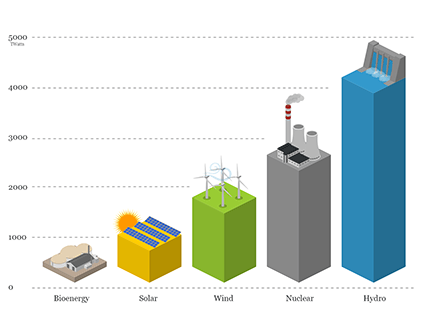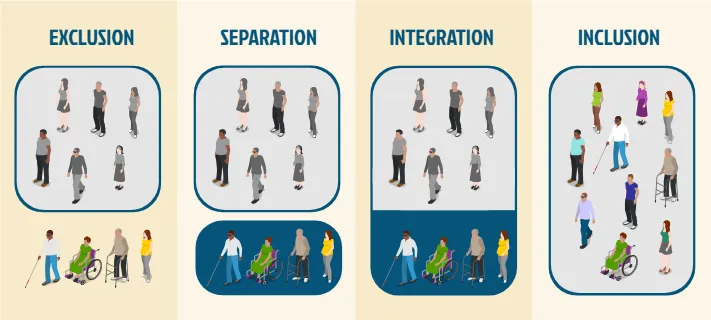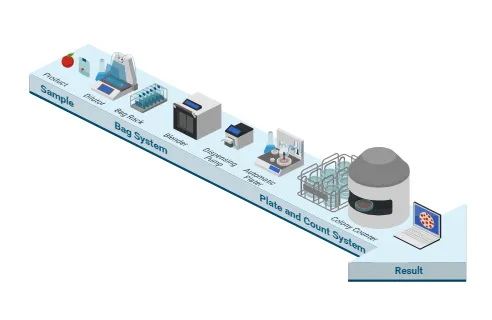

Whether you need an infographic for marketing, education, business, healthcare, or research, you can use Icograms Designer as an infographic maker. The flexible infographic software gives you the freedom to build visuals that fit your topic and audience.
Design Informational Infographics Easily
Icograms Designer gives you everything you need to visualize ideas and data in minutes. The simple drag-and-drop editor lets you arrange shapes, icons, and text quickly, creating clean and balanced layouts without complicated software. You can fully customize colors to match your branding or presentation theme.The platform works as an infographic creator, helping you turn information into an engaging visual story. Whether you’re preparing a marketing report, classroom presentation, or public awareness poster, your infographic will always look organized and professional.
Create, Clarify, and Present Your Ideas Beautifully
Icograms Designer includes a vast library of icons and symbols designed to fit perfectly together. You’ll find elements for every topic — from business and education to science, logistics, healthcare, and more. Each icon is vector-based, so you can resize and recolor it without losing quality — perfect for both digital and print use.To make your infographic complete, add titles, labels, and descriptions directly in Icograms Designer. Place them exactly where you need them to clarify your visuals and guide your audience. You can easily adjust font styles, text size, and alignment to ensure every element is readable and consistent. Use annotations to explain steps, highlight trends, or emphasize key facts — your audience will thank you for making things easy to understand.
When your infographic is ready, export it in high-resolution PNG or scalable SVG format. This allows you to include your design in websites, reports, slides, or printed materials without losing quality. Whether you’re publishing online or printing large posters, your Icograms designs will stay sharp, colorful, and professional everywhere.
Customize Your Infographic Design
Every project has different visual requirements. With Icograms Designer, you can customize your infographic to match your brand, presentation, or communication goals. Adjust colors, icons, text, and layouts to create a custom infographic instead of relying on a generic template.You can also combine different graphic elements to create diagrams, processes, comparisons, timelines, and other visual formats. This flexibility makes Icograms Designer a useful infographic-making tool for many types of projects.
Export Your Infographic as SVG or PNG
When your infographic is ready, export it in high-resolution PNG or scalable SVG format. This allows you to include your design in websites, reports, slides, or printed materials without losing quality. SVG is especially useful when you need a scalable graphic for professional or digital projects. Whether you’re publishing online or printing large posters, your Icograms designs will stay sharp, colorful, and professional everywhere.Bring Your Information to Life
In conclusion, Icograms Designer is a powerful design app for creating compelling informational infographics. With its extensive icon library, intuitive interface, and customizable features, you can effectively present complex information in a visually appealing and easily digestible manner.Whether you're creating a business report, educational visual, marketing graphic, or data-driven presentation, Icograms Designer gives you the infographic software and tool to bring your ideas to life. Elevate your data storytelling and captivate your audience with Icograms Designer, your go-to solution for creating impactful informational infographics.